Key Takeaways
- A B2B ecommerce portal gives business buyers company accounts, negotiated prices, quote requests, and reordering, which a regular online store cannot offer without custom work.
- Custom pricing needs price lists, tiered discounts, contract pricing, customer catalogs, and clear rule priorities, backed by reliable ERP sync so every buyer sees the right price.
- RFQ features move large or custom deals online with request forms, quote builders, negotiation, approvals, tracking, and one-click quote-to-order conversion with ERP sync.
- Costs run from $8,000 to $100,000+, with timelines from about two months to a year. Data quality, integrations, and pricing complexity drive most of the price.
- Common challenges include legacy systems, messy data, low adoption, and complex approvals. Launch focused, test with real customers, and improve in stages.
A business buyer rarely pays list price. They ask for a quote, expect their negotiated rate, and often need approval before an order goes through. Most standard online stores were not built for that kind of back-and-forth buying journey.
A B2B portal fixes that gap. Custom pricing shows each customer the right price automatically, while request-for-quote (RFQ) tools handle large or complex deals without endless email threads. Together, they save sales teams time and help buyers reorder on their own.
This guide explains how to develop a B2B ecommerce portal. You will learn which features matter, how the technology fits together, how the build process runs, what it costs, and which challenges to plan for, so you can launch confidently.
What Is a B2B Ecommerce Portal and Why Custom Pricing and RFQ Matter
A B2B ecommerce portal is an online ordering platform built for business buyers, with company accounts, negotiated prices, and quote requests. Here is what it is, and why custom pricing and RFQ features set it apart from a regular store.
1. What a B2B Ecommerce Portal Is
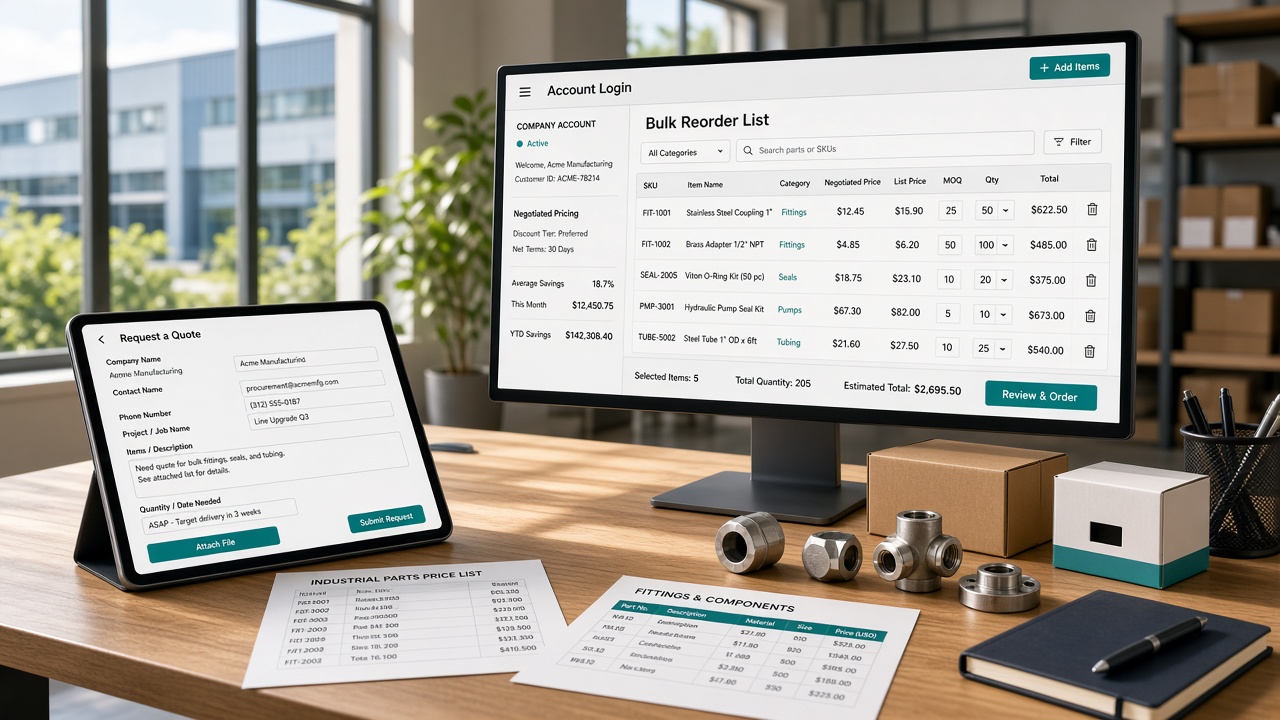
Business buyers log in to a company account instead of checking out as guests. They see their own catalog, negotiated prices, and credit terms, place or reorder in bulk, track shipments, and download invoices, with several users and approval steps.
2. A Large and Growing Market
The opportunity is large. eMarketer estimates US B2B ecommerce site sales at $2.297 trillion in 2024, up 10.5% year over year, and forecasts $3.027 trillion by 2028. Wholesalers, distributors, and manufacturers alike are steadily moving more orders online each year.
3. Why Custom Pricing Matters
Business customers often pay negotiated prices. Contracts, volume tiers, and long-term relationships create different prices for different buyers. A portal applies the right price automatically, removing quoting delays, preventing errors, and showing customers their agreed rates without a phone call.
4. Why RFQ Features Matter
Big or custom orders still need a quote. RFQ tools let buyers request pricing, and sales teams respond in one place. Gartner found 67% of B2B buyers prefer a rep-free experience in March 2026, up from 61% a year earlier.
Custom Pricing Features: Price Lists, Tiered Discounts, and Contract Pricing
Pricing is where B2B portals get complicated. Each customer may have their own list, discounts, and contract terms.
When you hire ecommerce developers, ask how they will model these rules, so the right price appears for every buyer, every time.
1. Customer-Specific Price Lists
Price lists are the foundation. Create lists per customer or customer group, with prices per product, currency, and effective dates.
Assign them to company accounts, import updates from your ERP or spreadsheets, and keep a fallback to the standard price.
2. Tiered and Volume Discounts
Volume tiers reward larger orders. Define quantity breaks per product, show them on the product page, and recalculate in the cart.
Support mix-and-match thresholds across a product family, so buyers see how adding a few more units lowers their price.
3. Contract Pricing
Contract pricing locks in negotiated rates. Tie prices to a contract with start and end dates, covered products, and volume commitments.
Alert sales before expiry and automatically revert to standard pricing, so expired deals never keep applying old, unprofitable prices.
4. Customer-Specific Catalogs and Order Rules
Not every buyer should see every product. Control catalogs by account, region, or customer group, and hide restricted items.
Set minimum order quantities, case packs, and unit conversions so buyers order correctly and your warehouse always receives clean orders.
5. Pricing Rules, Priorities, and Promotions
Rules decide which price wins. Set priority between price lists, tiers, contracts, and promotions, define if discounts stack, and add margin floors.
Keep an audit trail of every price change, so teams can explain why a buyer saw a price.
6. ERP Sync and Fast Price Lookup
Prices usually live in your ERP, so the portal must sync reliably. Pull prices through APIs or scheduled imports, cache results for speed, and test with large catalogs.
A slow or outdated price lookup frustrates buyers and creates order disputes.
RFQ Features: Request-for-Quote Workflow, Negotiation, and Quote-to-Order
Some orders are too big or too custom for a shopping cart. An RFQ workflow moves those deals online, from first request to signed order.
Here are the features that keep quotes fast, accurate, and easy for buyers and sales teams.
1. Easy Quote Request Forms
Let buyers request a quote from any product page, cart, or saved list. Capture quantities, target price, delivery date, shipping address, and file uploads like drawings or specs.
Pre-fill company details so busy buyers submit requests in under a minute.
2. Quote Routing and Sales Dashboard
Requests should reach the right person fast. Route them by product, region, or customer, set response-time targets, and show everything in one sales dashboard.
Alerts for new and overdue requests prevent quotes from sitting unnoticed in a crowded shared inbox.
3. Quote Builder With Live Pricing
Sales reps build quotes from live catalog, price list, and stock data. Add line items, discounts, shipping, taxes, and terms, with margin checks before sending.
Templates and branded PDFs speed up the process and cut errors from retyping data.
4. Negotiation and Counteroffers
Quotes rarely end after one round. Let buyers accept, decline, or counter inside the portal, with comments and revision history on every version.
Keep all messages attached to the quote, so nobody searches email threads to find the final agreed terms.
5. Approvals and Quote Expiry
Big discounts may need manager sign-off. Build approval rules by discount size, order value, or margin, and track who approved what.
Set expiry dates with reminders, so prices do not stay open when costs change and old quotes stop circulating.
6. Quote Status Tracking and Buyer Notifications
Buyers should never wonder where their quote stands. Show status in their account, from submitted to under review, sent, countered, accepted, or expired.
Send email and in-app alerts at each step, and keep downloadable PDFs and all past quotes handy.
7. Quote-to-Order Conversion and ERP Sync
When a buyer accepts, convert the quote into an order in one click, with locked prices, terms, and delivery dates.
Send it to your ERP automatically, and notify the buyer, so nobody retypes details or loses accuracy between systems.
8. Analytics, Permissions, and Audit Trail
Measure to improve. Track quote volume, response time, win rate, average discount, and reasons for lost deals.
Set user roles for who can view, edit, or approve quotes, and keep an audit trail, so managers can coach reps and resolve disputes.
How to Develop a B2B Ecommerce Portal: Process, Tech Stack, and Integrations
Building a B2B portal is as much about process as technology. B2B ecommerce development works best when pricing rules, ERP data, and buyer workflows are understood first. Here is a practical path, including the tools and integrations to plan for.
Stage 1: Discovery and Requirements
Start with the people and processes. Interview sales reps, customer service, finance, and key buyers to map how quotes, pricing, approvals, and reorders work today.
Turn findings into goals, a prioritized feature list, and success metrics, like quote turnaround time.
Stage 2: Audit Your Systems and Data
List every system that touches an order: ERP, CRM, PIM, warehouse, tax, shipping, and payment tools.
Review product data, customer records, and price lists for gaps. Clean data now, because portal accuracy depends on it, and late fixes cost more.
Stage 3: Choose the Platform and Tech Stack
Decide to buy, build, or combine. B2B-ready platforms such as Adobe Commerce, BigCommerce, commercetools, Salesforce Commerce, and OroCommerce offer built-in pricing and accounts.
Custom builds fit unusual workflows. Check headless options, front-end frameworks like Next.js, cloud hosting, and total cost.
Stage 4: Design the Architecture and Integrations
Design the architecture before coding. Choose an API-first approach, decide which system owns prices, stock, and customer data, and plan how data flows between portal, ERP, CRM, and PIM.
Middleware or an integration platform can greatly reduce fragile point-to-point connections.
Stage 5: Design for Business Buyers
Design for repeat buyers who know what they want. Offer quick order by SKU, bulk upload, saved lists, one-click reorder, and role-based views for buyers, approvers, and finance.
Test prototypes with real customers, and simplify anything that slows routine orders.
Stage 6: Build the Core Portal
Build the core in short sprints: company accounts, user roles, catalog, search, cart, checkout, payment terms, and the pricing engine.
Start with your most common customer types, and demo each sprint to sales and customer service, so feedback arrives early.
Stage 7: Build RFQ and Connect Your Systems
Strong ecommerce software development services connect the portal to ERP, CRM, PIM, tax, shipping, and payment systems, and build the RFQ workflow.
Use APIs, webhooks, and queues with retries; test every connection in sandboxes so orders and prices stay accurate.
Stage 8: Migrate Data and Onboard Customers
Migrate customers, contacts, price lists, products, and past orders in rehearsals.
Compare results with source systems, fix mismatches, and give customers a way to claim their accounts. Buyers who log in and see wrong prices rarely trust the portal again.
Stage 9: Test Pricing, Quotes, and Security
Test pricing rules, approvals, quote flows, and order sync with real scenarios from your largest customers.
Add load, security, and permission tests, then run user acceptance testing with sales staff and pilot buyers. Fix every pricing error before launch day.
Stage 10: Launch, Train, and Improve
Launch to a few key customers first, train sales and support teams, and keep a fallback ordering route open.
Track adoption, order accuracy, quote turnaround, and support tickets, then expand in waves and add features, such as punchout or EDI.
How Much Does It Cost to Build a B2B Ecommerce Portal?
Most B2B ecommerce portals cost between $8,000 and $100,000+, depending on pricing rules, RFQ features, integrations, and scale. Simple portals sit at the low end, while large, multi-system builds cost more.
| Package | Price | Typical Timeline | Best For | What's Included |
|---|---|---|---|---|
| Startup B2B Ecommerce Platform | From $8,000 to $20,000 | 2 to 4 months | Small manufacturers and wholesalers moving offline ordering online | Core B2B commerce functionality, company accounts and user roles, catalog and search, customer-specific price lists, basic quote request form, reorder and saved lists, payment terms, one ERP or accounting integration |
| Business B2B Ecommerce Platform | From $20,000 to $45,000 | 4 to 8 months | Growing distributors and manufacturers with several customer types | Advanced B2B purchasing workflows, tiered and contract pricing, full RFQ and quote-to-order flow, approval rules, quick order and bulk upload, ERP, CRM, and PIM integration, buyer analytics, post-launch support |
| Enterprise B2B Ecommerce Solution | From $45,000 to $100,000+ | 8 to 12+ months | Large enterprises with multiple brands, regions, or business units | Large scale B2B architecture, multi-brand and multi-region storefronts, complex pricing and catalog rules, punchout and EDI, SSO and advanced permissions, custom ERP and OMS integrations, high-availability cloud setup, load and security testing, dedicated team |
B2B Ecommerce Portal Development Challenges and How to Solve Them
Every B2B portal hits similar obstacles: messy data, complex pricing, legacy systems, and slow adoption. A B2B ecommerce development company has usually seen them before. Here are the most common challenges, and practical ways to solve each one of them.
1. Complex Pricing Rules
B2B pricing is rarely simple. Customer lists, contract rates, volume tiers, promotions, and margin floors can conflict, and the portal must pick the right price every time. One wrong price can mean lost margin, angry customers, or lengthy billing disputes.
How to solve it: Document every pricing rule, set clear priorities, test with real customer scenarios, and keep an audit trail of price changes.
2. ERP and Legacy System Integration
Most B2B companies run older ERP, warehouse, and accounting systems with limited APIs. Data formats differ, updates arrive in batches, and one failed sync can show wrong stock or prices. Integration is often the largest, least predictable part of the project.
How to solve it: Audit systems early, use middleware or integration platforms, add retries and monitoring, and test every data flow with sandbox data.
3. Poor Product and Customer Data
A portal is only as good as its data. Missing attributes, duplicate SKUs, wrong units, and outdated customer records lead to bad search results and failed orders. Buyers who cannot find a part quickly will call sales or switch suppliers.
How to solve it: Clean data before migration, assign data owners, use a PIM for products, and add validation rules that block bad records.
4. Low Buyer Adoption
Many B2B customers are used to calling their rep, emailing orders, or sending spreadsheets. If the portal feels slower or less personal, they ignore it. Without adoption, you pay for a portal and still run manual order entry alongside it.
How to solve it: Involve key customers early, offer quick order and reordering, train reps to promote the portal, and track adoption by account.
5. Complex Approvals and Account Structures
B2B accounts are not single users. A buyer may need manager approval, spending limits, shared carts, and separate ship-to addresses across branches. Building these rules is harder than it looks, and mistakes can block real orders or allow unauthorized ones.
How to solve it: Map real account structures first, build flexible roles and approval rules, and test with real customers who have multiple branches.
6. Security, Permissions, and Compliance
B2B portals hold contract prices, customer lists, and payment terms that competitors would love to see. A permission mistake can expose one customer's pricing to another. Regulated industries and international buyers add privacy, tax, and trade compliance requirements on top.
How to solve it: Use role-based access, encrypt data, run penetration tests, log access to pricing, and review privacy and tax rules per market.
7. Performance With Large Catalogs and Custom Prices
Large catalogs plus per-customer prices strain performance. Each page may need a unique price lookup, and heavy search or bulk orders can slow the site. Slow pages frustrate buyers who place the same order weekly, and they notice every second.
How to solve it: Cache price lookups, use fast search, load test with real catalogs and bulk orders, and monitor speed by customer segment.
8. Budget, Scope Creep, and Change Management
B2B portals touch sales, finance, operations, and IT, so every team has requests. Scope grows, timelines slip, and costs climb. Staff may also resist changes to familiar quoting and ordering habits, which slows rollout even after the technology is ready.
How to solve it: Launch a focused first version, prioritize requests by business value, involve sales and finance early, and train teams before launch.
Final Thoughts
A B2B ecommerce portal succeeds when it feels like your best salesperson working around the clock.
Buyers see their own prices, request quotes without email chains, and reorder in minutes. Your team spends less time retyping orders and more time growing accounts.
Start with how your customers actually buy. Map pricing rules, approval steps, and quote workflows, then build the features that remove the most friction first.
Connect the portal carefully to your ERP and product data, because accuracy earns trust faster than any design.
Launch with a focused first version, learn from real orders, and expand in stages. Choose a partner who understands B2B complexity, and keep improving. Do that, and your portal becomes a lasting competitive advantage.
Frequently Asked Questions
1. What is a B2B ecommerce portal?
A B2B ecommerce portal is an online platform where business customers log in to a company account, see their own catalog and negotiated prices, place and reorder orders, request quotes, and track invoices, usually with several users, roles, and approval steps.
2. How is a B2B portal different from a B2C online store?
B2B portals serve repeat business buyers, not one-time shoppers. They add company accounts, custom prices, quote requests, approval workflows, payment terms, bulk and quick ordering, and deep ERP integration, which a standard consumer store does not usually provide out of the box.
3. What is an RFQ in B2B ecommerce?
RFQ stands for quote request. Buyers submit a request for large or custom orders, the sales team responds with pricing and terms, and both sides can negotiate in the portal. An accepted quote then converts into an order automatically.
4. How does custom pricing work in a B2B portal?
Each customer or customer group gets its own price list, with tiered volume discounts and contract rates that apply automatically at login. The portal follows priority rules to decide which price wins, and syncs with the ERP, so prices stay consistent.
5. How much does it cost to build a B2B ecommerce portal?
Costs typically range from $8,000 to $100,000+, depending on features, integrations, and scale. Startup builds sit at the low end, while enterprise portals with complex pricing, EDI, and multiple systems cost far more. Licenses and hosting are usually separate, so budget for them.
6. How long does it take to build a B2B portal?
A startup portal often takes two to four months, a business platform four to eight months, and an enterprise solution eight to twelve months or more. Timelines depend on integrations, data cleanup, pricing complexity, and how quickly your team gives feedback.
7. Should I use a B2B platform or build a custom portal?
Platforms like Adobe Commerce, BigCommerce, and commercetools offer B2B features faster and cost less upfront. Custom builds fit unusual pricing, approval, or integration needs. Many companies combine a platform with custom modules, so compare features, total cost, and flexibility before choosing one.
8. How does a B2B portal integrate with my ERP?
Most portals connect to the ERP through APIs, middleware, or scheduled imports. The ERP typically owns prices, stock, and customers, while the portal sends orders back. Clear data ownership, retries, and monitoring keep both systems accurate when one side slows or fails.
9. How do I get customers to use the portal?
Involve key customers early, make reordering and quick order faster than calling or emailing, and train reps to promote it. Show customers real benefits, like live stock, order history, and instant quotes, and track adoption by account to find who needs help.
10. What mistakes should I avoid when building a B2B portal?
Common mistakes include ignoring data quality, underestimating ERP integration, skipping real customer testing, building every feature at once, and forgetting training. Start with a focused first version, test pricing and quotes with real scenarios, and expand in stages after launch.