
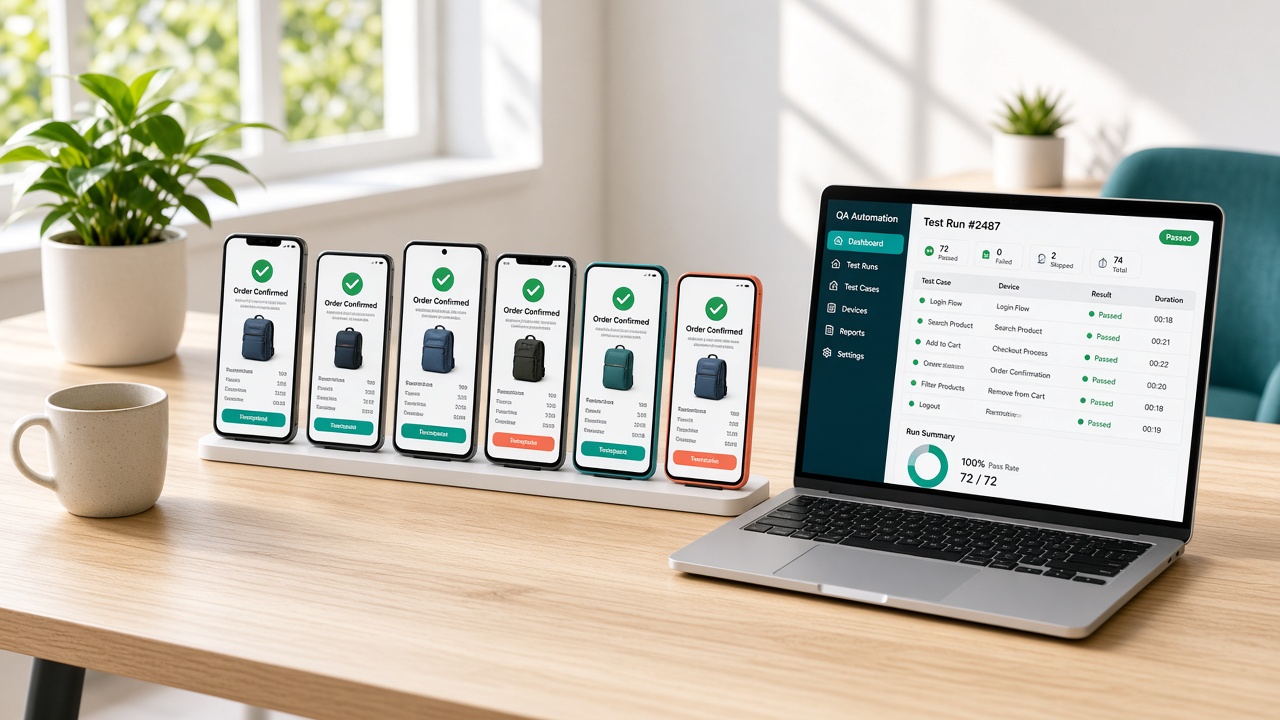
Key Takeaways
- Ecommerce bugs cost real money, so testing should protect checkout, payments, and login first.
- Every store needs functional, payment, mobile, performance, security, and regression testing.
- Automating repeat checks lets teams release often without breaking what already works.
- Most ecommerce app testing projects cost between $1,500 and $12,000, depending on scope and automation.
- Run load tests before big sales, and monitor checkout rates and errors after every release.
A shopper adds three items to the cart, taps checkout, and the payment button does nothing. She tries once more, then closes the app. You never see that lost sale, and neither does your dashboard.
Ecommerce apps are unforgiving. Shoppers compare, switch, and leave fast. Slow screens, broken promo codes, and failed payments cost real revenue and damage trust long after the bug is fixed.
Strong testing and quality assurance catch those problems before customers do.
This guide explains ecommerce app testing and QA, from what to test and which tools to use, to the QA process, costs, and common challenges. You will see how to plan a launch that is stable, secure, and ready for real traffic.
Why Ecommerce App Testing and QA Matter: The Cost of a Buggy Launch
A buggy launch costs more than the fix. Failed orders, angry reviews, and emergency patches pile up fast. Here is why testing and QA matter for ecommerce apps, and what a rough release can really cost you in lost revenue.
1. Lost Sales You Never See
Many lost sales never show up as bugs. Baymard’s research found 17% of surveyed US online shoppers abandoned a cart in the previous three months because a site had errors or crashed, alongside an average cart abandonment rate near 70%.
2. Trust Is Hard to Win Back
Shoppers judge an app within seconds. A crash at checkout, a promo code that fails, or a slow search turns into one-star reviews and uninstalls. Those ratings stay visible, so a rough first week can affect new downloads and trust.
3. Late Fixes Cost More
Bugs are cheaper to fix early. Found in testing, a payment error is a ticket. Found after launch, it is lost orders, rushed hotfixes, and support calls, often during a sale. Fixes made under pressure can also introduce new problems.
4. Checkout Quality Pays Off
Checkout quality pays off. Baymard estimates about $260 billion in lost orders could be recovered across the US and EU through better checkout design alone. Testing checkout flows on real devices, with real payment cases, helps you capture your share.
Types of Testing Every Ecommerce App Needs, and the Critical Flows to Cover
Bugs cost money in ecommerce. One broken checkout button can wipe out a day of sales.
Before you hire ecommerce developers, know which tests matter most. Here are six testing types, and the critical shopping flows each one should cover.
1. Functional Testing
Functional testing checks that every feature works as designed. Cover the core path: search, product page, add to cart, coupon codes, checkout, and order confirmation. Also test edge cases, like out-of-stock items, empty carts, and invalid promo codes.
2. Payment and Checkout Testing
Payments deserve their own dedicated tests. Try every method you accept: cards, Apple Pay, Google Pay, and PayPal. Test declined cards, expired cards, and timeouts. Confirm taxes, shipping, and totals are correct, and that failed payments never create duplicate orders.
3. Mobile and Cross-Device Testing
Most US shoppers buy on phones. Test on iPhones and Android devices across different screen sizes and OS versions. Check taps, scrolling, keyboards, and the back button. A flow that works on a laptop can easily break on a phone.
4. Performance and Load Testing
Speed sells. Slow pages push shoppers away. Test load times on 4G connections, then simulate traffic spikes like Black Friday. Watch search, cart, and checkout under pressure. Fix slow images, heavy scripts, and database bottlenecks before a sale exposes them.
5. Security Testing
Shoppers trust you with sensitive payment data. Test login, password reset, account pages, and checkout for common attacks, like SQL injection and cross site scripting. Confirm HTTPS everywhere, secure payment handling, and that one customer can never see another’s orders.
6. Regression and Integration Testing
Every update can break something old. Run regression tests after each release, covering login, cart, checkout, and order emails. Test integrations with payment gateways, shipping carriers, tax tools, and inventory systems. Automate these so they run on every code change.
Ecommerce Test Automation: Tools and Tech Stack for QA Teams
Manual testing can’t keep up with weekly releases. Automation catches bugs faster and keeps checkout safe.
Good ecommerce software development services build test automation into every project. Here are eight tools and practices QA teams use to automate smartly.
1. Playwright for Web Testing
Playwright is a popular choice for web storefronts. It tests Chrome, Safari, and Firefox with one script, runs fast, and handles modern JavaScript sites well. Use it to automate flows like search, add to cart, and checkout.
2. Cypress for Frontend Testing
Cypress gives developers quick feedback while they build. It runs inside the browser and shows clear error messages, making broken tests easy to debug. It works well for React and Next.js storefronts, though it covers fewer browsers than Playwright.
3. Appium for Mobile App Testing
Appium automates native and hybrid apps on both iOS and Android with one framework. Write tests once and run them across real devices and emulators. Use it to check taps, swipes, push notifications, and mobile checkout flows.
4. Selenium for Legacy and Broad Browser Coverage
Selenium has been around for years and supports many languages and browsers. It’s a safe pick if your team already has Selenium tests or needs broad compatibility. Setup takes more effort, and tests can run slower than newer tools.
5. Postman and REST Assured for API Testing
Many ecommerce bugs hide in the API layer. Postman lets teams build and automate API checks quickly, while REST Assured fits Java-based projects. Test pricing, inventory, orders, and payment webhooks, since they power both your website and apps.
6. k6 or JMeter for Load Testing
Traffic spikes break stores. Tools like k6 and JMeter simulate thousands of shoppers at once. Run them before big sales to find slow endpoints, database limits, and crashes. Fix problems before real customers feel them.
7. CI/CD Tools: GitHub Actions or Jenkins
Automation only helps if it runs automatically. Connect your tests to GitHub Actions or Jenkins, so they run on every pull request. Failed tests block the merge, which keeps broken code from ever reaching your live store.
8. Cloud Device Labs and Test Reporting
Cloud platforms like BrowserStack and Sauce Labs give you real phones and browsers without buying devices. Pair them with reporting tools like Allure to track failures and trends. Clear reports help the whole team spot flaky tests quickly.
Ecommerce App QA Process: From Test Planning to Release
Good QA doesn’t start when the code is finished. It starts at planning and runs until release day. Here is a ten step process that helps ecommerce teams find bugs early, protect checkout, and ship updates with much more confidence.
1. Review Requirements and Define Scope
Every ecommerce app development project needs clear QA goals from the start. Read the requirements with your team and flag anything vague. Decide which features, devices, and markets you’ll test, so everyone agrees on what done actually means for launch.
2. Write the Test Plan
A test plan keeps your QA team organized and focused. List what you’ll test, who tests it, which tools you’ll use, and the timeline. Rank features by risk. Checkout, payments, and login come first, because failures there cost real money.
3. Design Test Cases and Critical Flows
Turn requirements into clear, step-by-step test cases. Cover the main customer shopping flows: browse, search, add to cart, checkout, and order confirmation. Add edge cases too, like expired coupons, out-of-stock items, address errors, and declined payments.
4. Prepare the Test Environment and Data
Set up a staging site that closely mirrors production. Add realistic test data, including products, customers, and sample orders. Use sandbox modes for payment gateways, shipping carriers, and tax tools, so testing never charges real cards or ships real products.
5. Run Functional and Exploratory Testing
Start with functional tests against your test cases. Then add exploratory testing, where testers use the app like real shoppers and try unexpected things. Log every bug with clear steps, screenshots, device details, and severity, so developers can reproduce it.
6. Test Payments, Integrations, and Security
Test every payment method and third party integration. Check cards, wallets, shipping rates, taxes, coupons, and inventory sync. Run basic security checks as well, including login, password reset, and account pages, so one customer can never see another customer’s data.
7. Test Mobile, Performance, and Browsers
Test on real iPhones and Android phones, plus major desktop browsers. Most US shoppers buy on mobile, so check taps, keyboards, and slow mobile connections. Run load tests before big sales to find slow pages, database limits, and server crashes.
8. Retest Fixes and Run Regression Checks
Every fix can break something else. After developers fix bugs, retest each one. Then run a full regression suite covering login, search, cart, checkout, and order confirmation emails. Automate these checks so they run automatically on every single code change.
9. Complete User Acceptance Testing
Let real stakeholders try the app before launch. Product owners and a small group of customers can run through key flows. Review open bugs, set a clear go or no-go rule, and fix every severe issue before release day.
10. Release, Monitor, and Learn
Release in stages when you can, starting with a small share of traffic. Watch checkout rates, errors, and customer complaints for the first few days. Keep a rollback plan ready, then feed what you learn into the next test cycle.
How Much Does Ecommerce App Testing Cost?
Testing is a smaller slice of your ecommerce app development cost, but it protects every dollar you spend elsewhere.
Most testing projects fall between $1,500 and $12,000. The final price depends on app size, devices covered, automation depth, and how often you plan to release updates.
| Testing Type | Description | Cost Range ($) |
|---|---|---|
| Test Planning and Strategy | Scope, risk ranking, test plan, and timeline | 200-400 |
| Functional Testing | Search, cart, checkout, coupons, and order confirmation flows | 400-900 |
| Payment and Checkout Testing | Cards, wallets, declined payments, taxes, and shipping totals | 300-700 |
| Mobile and Cross-Device Testing | iPhone, Android, and browser checks across screen sizes | 400-900 |
| Performance and Load Testing | Page speed checks and traffic spike simulations before big sales | 500-1,200 |
| Security Testing | Login, account, and data protection checks for common attacks | 500-1,300 |
| API and Integration Testing | Payment gateway, shipping, tax, and inventory connections | 300-800 |
| Test Automation Setup | Automated scripts for core flows and regression checks | 800-2,000 |
| User Acceptance Testing Support | Stakeholder review, bug triage, and go/no-go decision | 200-500 |
| Release Monitoring and Retesting | Post-launch checks, fix verification, and regression runs | 300-700 |
Ecommerce App Testing Challenges and How to Solve Them
Ecommerce testing is harder than it looks. Shoppers use many devices, payment methods, and traffic patterns, and every release can break something old. Here are eight testing challenges, along with ways to solve each one before it costs you sales.
1. Too Many Devices and Browsers
Shoppers use iPhones, Android phones, tablets, and several browsers. Each combination can behave differently. Testing everything manually takes too long, and skipping combinations lets device-specific bugs slip through and hit real customers and cost you sales on launch day.
How to solve it: Check your analytics to find the top devices and browsers your US shoppers use. Test those first on real devices or a cloud lab like BrowserStack, then cover the rest.
2. Complex Payment Testing
Payments involve cards, wallets, buy now pay later, and bank checks. Real transactions can’t be used for testing, and gateways behave differently in sandbox mode. One missed failure case can quickly lead to double charges, angry customers, or lost orders.
How to solve it: Use your gateway’s sandbox and official test card numbers. Write tests for declines, timeouts, and refunds, and confirm a failed payment never creates a duplicate order.
3. Test Data That Doesn’t Match Reality
Small test catalogs hide problems that only appear at scale. Real stores have variants, bundles, discounts, sale prices, and thousands of SKUs. If test data is too clean, bugs hide until real shoppers hit odd combinations that nobody planned for.
How to solve it: Copy a sanitized slice of your production catalog into staging. Include messy cases like sold out variants, bundles, and stacked discounts, and refresh the data regularly.
4. Flaky Automated Tests
Automated tests sometimes fail for no clear reason, even when nothing is actually broken. Slow pages, animations, and changing page elements cause false alarms. Teams start ignoring failures, and then a real bug gets dismissed as just another flaky test.
How to solve it: Use smart waits instead of fixed delays, and stable selectors like test IDs. Track flaky tests, fix or remove them quickly, and keep the suite small and trustworthy.
5. Traffic Spikes Break Stores
Stores often work fine on a normal Tuesday and crash on Black Friday. Load problems hide quietly in search, checkout, and databases. Teams skip load testing because it feels expensive, then pay far more later when a sale goes down.
How to solve it: Run load tests with k6 or JMeter before every major sale. Simulate peak traffic on search and checkout, then fix slow queries, heavy images, and server limits.
6. Third Party Integration Failures
Your store depends on payment gateways, shipping carriers, tax tools, and inventory systems. You don’t control their updates, outages, or rate limits. An API change on their side can quietly break your live checkout without any change in your code.
How to solve it: Use mock servers to test failure cases like timeouts and bad responses. Add contract tests and monitoring on key APIs, so you hear about breaks before customers do.
7. Frequent Releases and Regression Risk
Ecommerce teams ship updates constantly: new promos, features, bug fixes, and seasonal campaigns. Each change can break something that worked yesterday. Manual regression testing can’t realistically keep up, so bugs slip quietly into production and real shoppers find them first.
How to solve it: Automate a regression suite for login, search, cart, and checkout, and run it in CI on every pull request. Block merges when core tests fail.
8. Limited Time, Budget, and QA Skills
Small teams rarely have a full QA department. Deadlines are tight, and testing is often the very first thing cut. Rushed launches then lead to bugs, refunds, and bad online reviews that cost far more than the testing they skipped.
How to solve it: Focus on risk. Test checkout, payments, and login first, automate the repeat checks, and bring in outside QA experts for peaks like launches and holiday sales.
Final Thoughts
Ecommerce testing isn’t a final step before launch. It’s a habit that protects revenue every time you ship. One broken checkout button, one failed payment, or one slow sale day can undo weeks of marketing.
Cover the essentials: functional, payment, mobile, performance, security, and regression testing.
Automate the repeat checks, so your team can release often without fear. Follow a clear QA process from planning to release, and watch your numbers after launch.
Testing costs between $1,500 and $12,000 for most stores, which is small next to the sales a single bug can cost you. Start with checkout and payments, build from there, and keep improving. Reliable apps earn repeat customers.
Frequently Asked Questions
1. Why is testing so important for ecommerce apps?
Bugs hit revenue directly. A broken checkout, failed payment, or slow page sends shoppers to a competitor. Testing catches those problems before real customers do.
2. What types of testing does an ecommerce app need?
Most apps need functional, payment, mobile, performance, security, and regression testing. Integration testing also matters, since payments, shipping, and tax tools all connect to your store.
3. Which flows should I test first?
Start with checkout, payments, and login. Then cover search, add to cart, coupons, and order confirmation. Failures in those flows cost the most money.
4. Should I automate ecommerce testing?
Yes, for repeat checks like regression and core shopping flows. Keep manual and exploratory testing for new features and unexpected behavior that scripts can’t predict.
5. Which tools are best for test automation?
Playwright and Cypress work well for web stores, Appium for mobile apps, Postman for APIs, and k6 or JMeter for load tests. The best choice depends on your stack.
6. How much does ecommerce app testing cost?
Most projects fall between $1,500 and $12,000. Cost depends on app size, devices covered, automation depth, and how often you release updates.
7. How long does the QA process take?
A small store may finish in a week or two. Larger apps with many integrations and devices can take several weeks, especially when automation setup is included.
8. How do I test payments safely?
Use your payment gateway’s sandbox and official test card numbers. Never use real cards. Test declines, timeouts, refunds, and duplicate order prevention.
9. When should I run load tests?
Run them before big sales like Black Friday, major launches, or heavy ad campaigns. Fix slow search, checkout, and database issues before real traffic exposes them.
10. Should I hire an outside QA team?
It helps when your team is small or facing a big launch. Outside QA brings experience, devices, and extra capacity without the cost of a full-time hire.